

Software development is a high-stakes investment. Whether you’re building a mobile app, a SaaS platform, MVP, or an internal tool, budgeting isn’t just about assigning numbers—it’s about aligning resources with strategy, anticipating risks, and ensuring your product gets built without draining your runway.
Yet many founders and product managers treat software development cost as an afterthought. They set arbitrary numbers, underestimate complexity, and end up with bloated timelines or half-built features. This guide is here to change that.
We’ll walk through how to budget your software development with precision—from scoping and estimating to managing change and communicating with stakeholders. Whether you’re working with an in-house team, freelancers, or an external agency, this post will help you build smarter, not just cheaper.
Why Software Development costs Matters
Software development is notoriously unpredictable. Requirements shift, bugs emerge, and timelines stretch. Without a solid budget, you risk:
- Running out of funds mid-project
- Sacrificing quality to cut costs
- Losing stakeholder trust
- Delaying launch and revenue
A well-structured budget gives you control. It helps you prioritize features, allocate resources, and make informed trade-offs. It also sets expectations—internally and externally—so everyone knows what’s feasible and what’s not.
Think of your budget as a living blueprint. It’s not just a spreadsheet—it’s a strategic tool that guides decision-making throughout the development lifecycle.
Step 1: Define the Scope
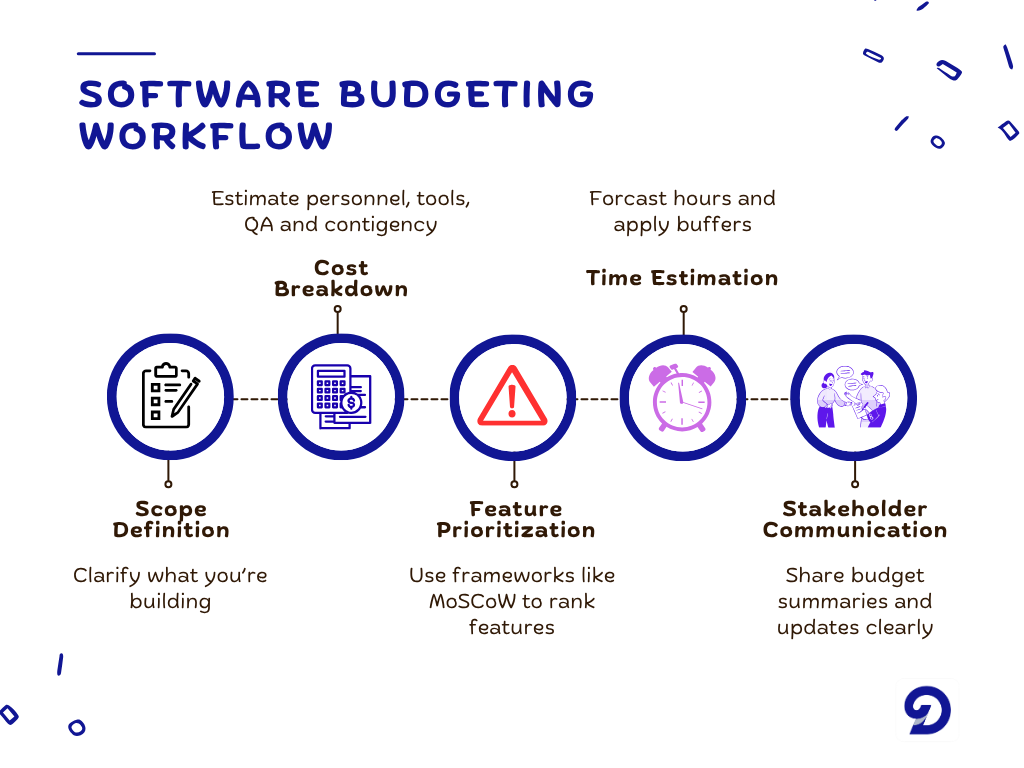
Before you talk numbers, you need to define what you’re building. Scope is the foundation of your budget. The more precise your scope, the more accurate your estimates.
Start by answering these questions:
- What problem does the software solve?
- Who are the users?
- What are the core features?
- What platforms will it run on (web, mobile, desktop)?
- Are there any integrations (APIs, third-party services)?
- What are the performance and security requirements?
Document everything. Use wireframes, user stories, or feature lists. The goal is to reduce ambiguity. A vague scope leads to vague budgets—and costly surprises.
If you’re not sure where to start, consider building an MVP (Minimum Viable Product). It’s a lean version of your software that delivers core value with minimal features. Budgeting for an MVP is often more manageable and allows for faster validation.
Step 2: Choose Your Development Model
How you build affects how you budget. There are three common models:
In-House Development
You hire developers, designers, and project managers as employees. This gives you control but comes with overhead—salaries, benefits, equipment, and management.
Budget considerations:
- Monthly payroll
- Hiring costs
- Office space and tools
- Training and onboarding
Freelancers
You hire independent contractors for specific tasks. This is flexible and cost-effective for small projects, but harder to scale and manage.
We can have budget considerations like hourly or project-based rate, time spent on coordination, and risk of turnover or delays while working with freelancers. Fiverr, Upwork, and Toptal are great freelance platforms that can offer general insights into the cost of hiring.
Development Agencies
You partner with a firm that provides a full team. This offers speed and structure but can be expensive. Most agencies quote for projects based on fixed or milestone-based pricing, and some include project management fees and scope change penalties. We at Doshby can provide you with detailed budgeting, as well as free consultation. Search engines and generative AI can provide a source to other agencies.
PS: Each model has trade-offs. Your budget should reflect not just the cost of development, but the cost of managing it.
Step 3: Break Down the Costs
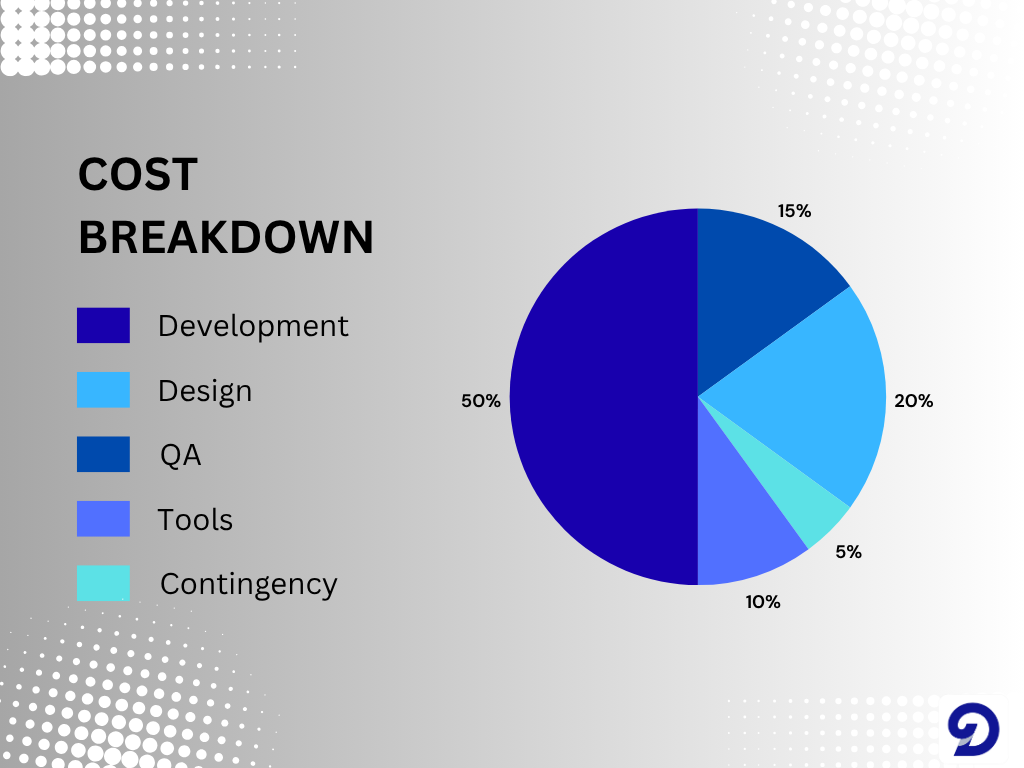
Now it’s time to get granular. Software development costs typically fall into five categories:
Personnel
This includes developers, designers, QA testers, and DevOps. Estimate based on hourly rates and expected hours.
Example: Frontend developer: pay/hour × No of hours. Bugs and fixes are also factored into this. This can be calculated simply by considering 10% of dev time used for these fixes and multiplying by pay/hour
Same can be applied for the Backend engineers, DevOps, QA testers and Designers
Tools and Infrastructure
You’ll need software licenses, cloud hosting, version control, and testing platforms.
Typically, one can calculate the cost using this format – AWS hosting: cost/month × time frame.
Do the same for design tools, CI/CD platforms like GitHub, as well as other third-party tools to be used. Although some third-party tools usage are rather unknown at the start, but that cost can be included into the contingency budget.
Project Management
Whether it’s a dedicated PM or time spent managing freelancers, this is often overlooked.
General rule to calculate this is; cost/hour × total number of hours.
Contingency
Always include a buffer—typically 10–20% of your total budget—for unexpected issues.
Example:
If total estimated cost = $60,000 and contingency (15%) = $9,000 then Final budget = $69,000
This breakdown helps you see where the money goes—and where you can adjust if need be.
Step 4: Prioritize Features
Not all features are created equal. Some drive core value, while others are nice-to-haves. Budgeting is about making choices.
Use a prioritization framework like MoSCoW:
- Must-Have: Essential for launch
- Should-Have: Important but not critical
- Could-Have: Adds value but can wait
- Won’t-Have: Out of scope for now
This helps you allocate budget to what matters most. It also gives you flexibility—if costs rise, you can defer lower-priority features without derailing the project.
Step 5: Estimate Time and Effort
Time directly impacts your budget. A well-estimated timeline helps forecast costs and set achievable milestones. Start by breaking the project into smaller tasks and estimating how long each will take. Draw insights from previous projects and involve your developers—they often provide the most accurate projections. Always add a 20–30% buffer to cover unexpected delays or technical challenges.
You can then multiply the total hours by your hourly rate to estimate costs, and review progress weekly to stay aligned with your targets.
Step 6: Track and Adjust
our budget is a living document. As development evolves, monitor your actual spending against estimates and make adjustments when needed. Use tools like Jira or Trello for task tracking, Harvest or Toggl for time tracking, and Google Sheets or Airtable for visual budget dashboards.
Each week, review:
- Estimated vs. actual hours
- Burn rate and remaining budget
- Feature completion rate
If you’re going over budget, assess your scope—can some features wait? Can workflows be optimized? Transparent communication and documentation keep everyone accountable and maintain client trust.
Step 7: Communicating with Stakeholders
Budgeting isn’t just a technical exercise—it’s also a communication strategy. Stakeholders, whether clients, executives, or investors, rely on clear financial visibility to make informed decisions.
Prepare a concise budget summary that outlines total cost, estimated timeline, feature scope, identified risks, and expected ROI. Whenever possible, use visuals such as charts, timelines, or feature roadmaps to make your presentation more digestible. The goal isn’t just to share numbers—it’s to tell a story of how each dollar spent contributes to building a valuable, scalable software asset.
When stakeholders feel confident in the planning and transparency behind your budget, they are more likely to stay engaged, supportive, and trusting throughout the project lifecycle.
Common Budgeting Mistakes to Avoid
Even seasoned teams fall into common budgeting traps.
One of the biggest is underestimating complexity—features that appear simple at first often require more time once real-world integration or edge cases arise.
Another frequent oversight is skipping or minimizing QA testing, which often results in costly fixes later.
Many projects also suffer from scope creep—unplanned features or change requests that derail original timelines and inflate costs. Over-reliance on freelancers without proper onboarding or documentation can further disrupt momentum, especially if turnover occurs mid-project. Finally, failing to track progress consistently is perhaps the most preventable mistake of all. If you don’t measure your performance, you can’t effectively manage it.
By avoiding these pitfalls, you not only save valuable time and money but also strengthen the overall predictability and professionalism of your development process.
Take Home
Budgeting your software development isn’t about cutting corners—it’s about building smart. It’s about aligning your vision with your resources, anticipating challenges, and making informed decisions every step of the way.
Whether you’re bootstrapping an MVP or scaling a full product, a well-crafted budget is your roadmap. It keeps your team focused, your stakeholders confident, and your product moving forward.
Start with scope. Choose your model. Break down costs. Prioritize features. Estimate time. Track progress. Communicate clearly. And above all—stay flexible.
Software development is a journey. Your budget is the compass.
Struggling to budget your software project with confidence? Book a free strategy call with our team and get expert guidance tailored to your scope, timeline, and goals. Let’s turn your vision into a well-funded reality without the guesswork.